| Variable Name | Description |
|---|---|
| ID | Institution ID number |
| Name | Name of the institution |
| State | State where the institution is located |
| Main | Main campus? (1 = yes, 0 = branch campus) |
| Control | Control of institution (Private, Profit, Public) |
| Region | Region of the country (Midwest, Northeast, Southeast, Territory, West) |
| Locale | Locale of the institution (City, Rural, Suburb, Town) |
| Enrollment | Undergraduate enrolment |
| PartTime | Percent of undergraduates who are part-time students |
| TuitionIn | In-state tuition and fees |
| TuitionOut | Out-of-state tuition and fees |
| White | Percent of undergraduates who report being white |
| Black | Percent of undergraduates who report being black |
| Hispanic | Percent of undergraduates who report being Hispanic |
| Asian | Percent of undergraduates who report being Asian |
| Other | Percent of undergraduates who do not report one of the above categories |
| AdmitRate | Admission rate |
| Selectivity | Ordinal category based on admission rate (Highly selective, Moderately selective, Less selective) |
Categorical Data – MSDA IFP
Week 09 – Tutorial 02
1. Tasks for today
This week’s task is highlighted in bold below. Please only focus on completing that task this week. In the next section, you will also find guided sub-steps you may want to consider to complete this week’s task.
- Read the College dataset into R, inspect it, and write a concise introduction to the data and its structure.
2) Identify, display, and describe the categorical variables.
- Display and describe a selection of numeric variables.
- Display and describe at least one relationship between two or three variables.
- Finish the report write-up, knit to PDF, and submit.
This tutorial is designed to help you complete Task 2.
1.1 Task 2 – sub-tasks
Tip
Tip: Hover over the footnotes for hints showing useful R functions.
This week you will focus on Task 2: Identify, display, and describe the categorical variables.
Below are some guided sub-steps you may want to consider to complete Task 2.
- Reopen last week’s
.qmdfile, as you will continue last week’s work and build on it.1
Read the CollegeScores dataset into R (from the provided CSV file in
datasets/) and give the object a sensible name, for examplecollege.2Use functions such as
glimpse()orstr()to inspect the structure of the dataset and identify which variables are categorical.3Separate the categorical variables into:
- nominal variables (no natural order), such as
State,Control,Region,Locale, andMain - ordinal variables (meaningful order), such as
Selectivity
- nominal variables (no natural order), such as
Convert these categorical variables to factors in R so that they are treated correctly in plots and summaries.4
Create frequency tables for at least three categorical variables, showing:
- the count
- the percentage of institutions in each category.5
Create bar charts for at least three categorical variables
(for example: number of institutions byRegion, byControl, and byLocale).6Improve the readability of your bar charts by:
- rotating x-axis labels if the names are long
- ordering nominal categories by frequency using
fct_infreq()where appropriate - keeping ordinal variables in their natural order
- adding clear axis labels and an informative title with
labs().7
For one ordinal categorical variable (
Selectivity), go further and calculate:- the median
- the quartiles
- the interquartile range (IQR)
In your written Analysis section, describe the distributions in words. For example:
- Which categories are most common?
- Are some categories rare?
- Is the distribution fairly balanced or dominated by one or two groups?
- For
Selectivity, what do the median and IQR tell you?
For each categorical variable in your report, include either the bar plot or the frequency table (not both) to avoid duplicating information.
You do not need to include R output in the report; you only need the written description. Keep this paragraph; you will re-use it in your report.
Data
CollegeScores Dataset
You will work with the CollegeScores dataset in this tutorial.
The dataset includes variables describing each institution’s location, sector, admissions selectivity, tuition costs, enrolment, and the demographic composition of their student body.
You can download the dataset “CollegeScores_teaching_with_selectivity.csv” on Learn ,”Materials - Week 9”
2 Worked Example
Consider the dataset provided in datasets/HollywoodMovies.csv, containing 1295 observations on the following 15 variables:
| Variable Name | Description |
|---|---|
| Movie | Title of the movie |
| LeadStudio | Primary U.S. distributor |
| RottenTomatoes | Critics' rating (Rotten Tomatoes) |
| AudienceScore | Audience rating (Rotten Tomatoes) |
| Genre | Film genre (e.g., Action Adventure, Comedy, Thriller) |
| TheatersOpenWeek | Number of screens on opening weekend |
| OpeningWeekend | Opening weekend gross (in millions) |
| BOAvgOpenWeekend | Average box office income per theatre, opening weekend |
| Budget | Production budget (in millions) |
| DomesticGross | U.S. gross income (in millions) |
| ForeignGross | Foreign gross income (in millions) |
| WorldGross | Worldwide gross income (in millions) |
| Profitability | Worldwide gross as a percentage of budget |
| OpenProfit | Percentage of budget recovered on opening weekend |
| Year | Year of release |
These data were compiled from Box Office Mojo, The Numbers, and Rotten Tomatoes.
We load the tidyverse package as we will use the functions
read_csv() and glimpse() from this package.
Load tidyverse and import the data
library(tidyverse)read_csv() reads CSV (comma-separated values) files.
The loaded data are stored in an object called movies using the arrow <-.
2.1 Load tidyverse and import the data
movies <- read_csv("HollywoodMovies.csv")2.2 Inspect the structure of the dataset
glimpse(movies)Rows: 1,295
Columns: 15
$ Movie <chr> "2016: Obama's America", "21 Jump Street", "A Late Qu…
$ LeadStudio <chr> "Rocky Mountain Pictures", "Sony Pictures Releasing",…
$ RottenTomatoes <dbl> 26, 85, 76, 90, 35, 27, 91, 56, 11, 44, 93, 63, 87, 9…
$ AudienceScore <dbl> 73, 82, 71, 82, 51, 72, 62, 47, 47, 63, 82, 51, 63, 9…
$ Genre <chr> "Documentary", "Comedy", "Drama", "Drama", "Horror", …
$ TheatersOpenWeek <dbl> 1, 3121, 9, 7, 3108, 3039, 132, 245, 2539, 3192, 3, 1…
$ OpeningWeekend <dbl> 0.03, 36.30, 0.08, 0.04, 16.31, 24.48, 1.14, 0.70, 11…
$ BOAvgOpenWeekend <dbl> 30000, 11631, 8889, 5714, 5248, 8055, 8636, 2857, 449…
$ Budget <dbl> 3.0, 42.0, NA, NA, 68.0, 12.0, NA, 7.5, 35.0, 50.0, 1…
$ DomesticGross <dbl> 33.35, 138.45, 1.56, 1.55, 37.52, 70.01, 1.99, 3.01, …
$ WorldGross <dbl> 33.35, 202.81, 6.30, 7.60, 137.49, 82.50, 3.59, 8.54,…
$ ForeignGross <dbl> 0.00, 64.36, 4.74, 6.05, 99.97, 12.49, 1.60, 5.53, 9.…
$ Profitability <dbl> 1334.00, 482.88, NA, NA, 202.19, 687.50, NA, 113.87, …
$ OpenProfit <dbl> 1.20, 86.43, NA, NA, 23.99, 204.00, NA, 9.33, 32.57, …
$ Year <dbl> 2012, 2012, 2012, 2012, 2012, 2012, 2012, 2012, 2012,…- This helps us identify which variables are categorical and how R is currently storing them.
2.3 Identify categorical variables
Some variables in this dataset are categorical.
a. Nominal categorical variables
LeadStudioGenreThese have no natural order.
b. Ordinal categorical variable
Year
Although Year is stored as a number, in this worked example we will treat it as an ordered categorical variable because the years follow a meaningful order.
Important
Movie is an identifier variable, not a useful categorical variable for summary plots or frequency tables.
Each movie title appears only once, so plotting Movie would not help us describe the data.
2.4 Convert categorical variables to factors
movies <- movies |>
  mutate(
    LeadStudio = factor(LeadStudio),
    Genre = factor(Genre))
We need the variable Year to be ordered.
- first we check the current levels of the variable
levels(movies$Year)NULL- We also check that R is reading the variable as a factor and not as a character:
class(movies$Year)[1] "numeric"to make sure the variable Year is a factor and is order :
movies <- movies |>
  mutate(
    Year = factor(Year, levels = sort(unique(Year)), ordered = TRUE)
  )
Functions:
unique()→ find categories
sort()→ order them
levels =→ tell R the correct order
- so,
levels = sort(unique(Year))means “take all the different years in the dataset, sort them from smallest to largest, and use that as the correct order of categories”.
unique(Year)
→ finds all the distinct year values in the dataset
(removes duplicates)
sort(...)
→ arranges those values in increasing order
(e.g. 2008, 2009, 2010, …)
levels = ...
→ tells R:
“these are the categories, and this is their correct order”
ordered = TRUE
tells R that the order matters, so
Yearis treated as an ordinal variable rather than a nominal one
3 Nominal categorical variables
For nominal variables, we focus on:
frequencies
percentages
bar charts
the most common category (the mode)
We do not calculate the median or IQR for nominal variables.
3.1 Frequency table: Genre
tbl_genre <- movies |>
  count(Genre, name = "n") |>
  mutate(
    Percent = round((n / sum(n)) * 100, 1)
  ) |>
  arrange(desc(n))

tbl_genre
# A tibble: 12 × 3
Genre n Percent
<fct> <int> <dbl>
1 Drama 386 29.8
2 Comedy 191 14.7
3 Action 170 13.1
4 Adventure 164 12.7
5 Thriller 155 12
6 Horror 85 6.6
7 Romantic Comedy 49 3.8
8 Documentary 41 3.2
9 Black Comedy 22 1.7
10 Musical 18 1.4
11 Western 10 0.8
12 Concert 4 0.33.2 Bar chart: Genre
plot_genre <- ggplot(movies, aes(x = Genre)) +
  geom_bar() +
  labs(x = "Movie Genre", y = "Frequency") +
  theme(axis.text.x = element_text(angle = 45, vjust = 1, hjust = 1))
plot_genre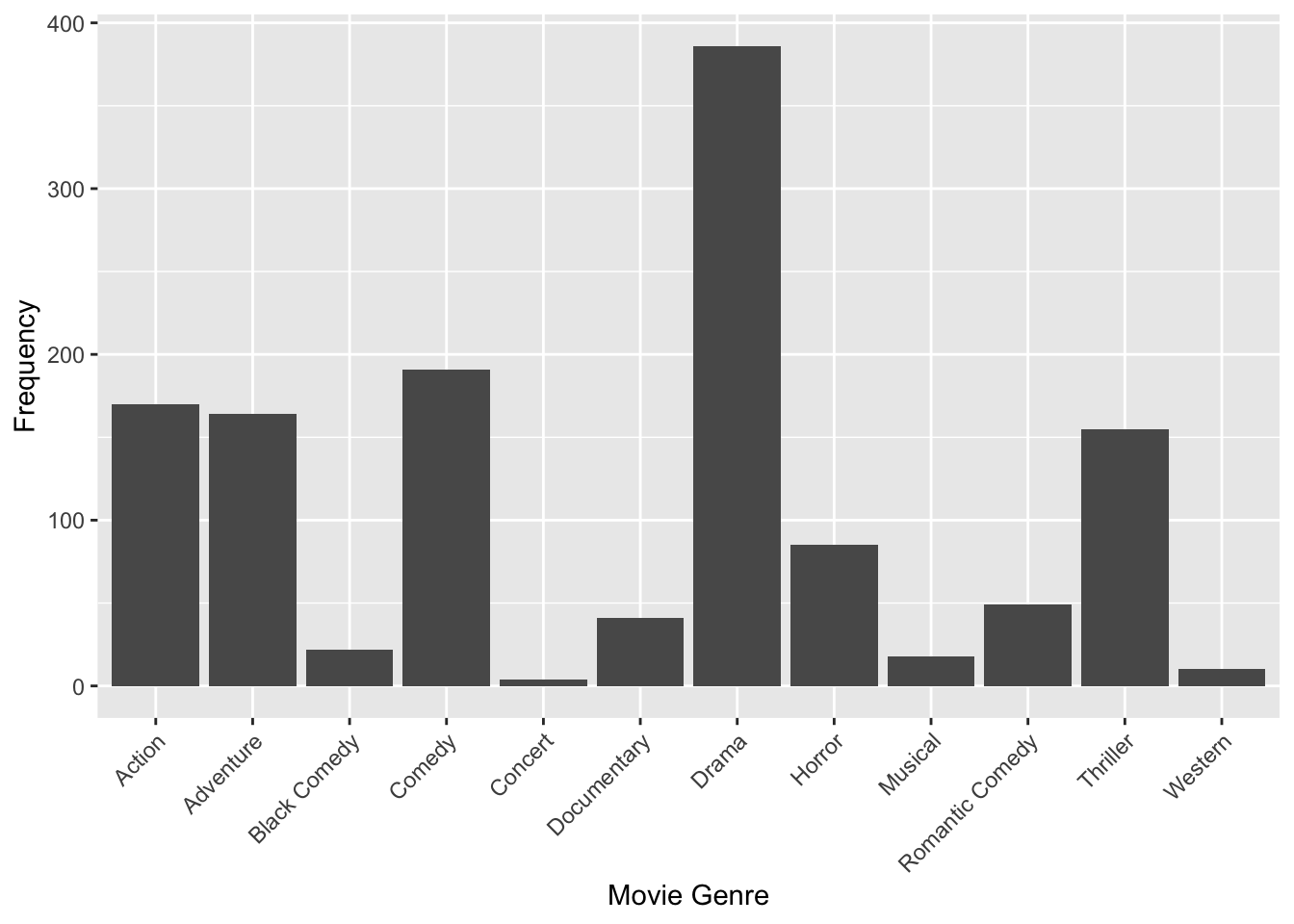
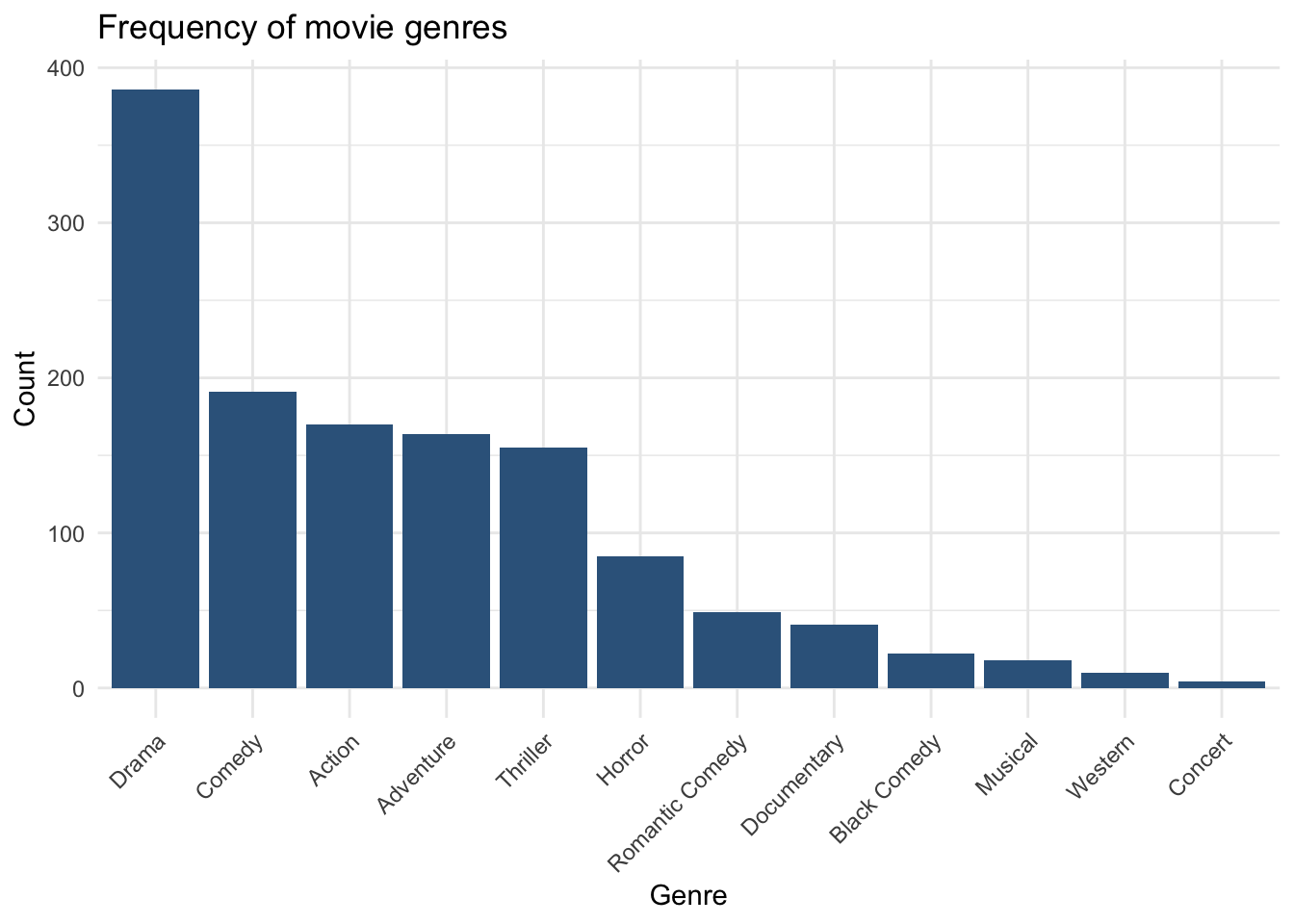
ggplot(movies, aes(x = fct_infreq(Genre))) +
  geom_bar(fill = "steelblue4") +
  labs(
    x = "Genre",
    y = "Count",
    title = "Frequency of movie genres"
  ) +
  theme_minimal() +
  theme(
    axis.text.x = element_text(angle = 45, hjust = 1)
  )
3.3 Frequency table: LeadStudio
tbl_studio <- movies |>
  count(LeadStudio, name = "n") |>
  mutate(
    Percent = round((n / sum(n)) * 100, 1)
  ) |>
  arrange(desc(n))

tbl_studio
# A tibble: 99 × 3
LeadStudio n Percent
<fct> <int> <dbl>
1 Warner Bros. 136 10.5
2 Universal Pictures 114 8.8
3 Lionsgate 106 8.2
4 Twentieth Century Fox 103 8
5 Paramount Pictures 76 5.9
6 Sony Pictures Releasing 72 5.6
7 Walt Disney Studios Motion Pictures 72 5.6
8 Focus Features 46 3.6
9 Sony Pictures Classics 44 3.4
10 Fox Searchlight Pictures 42 3.2
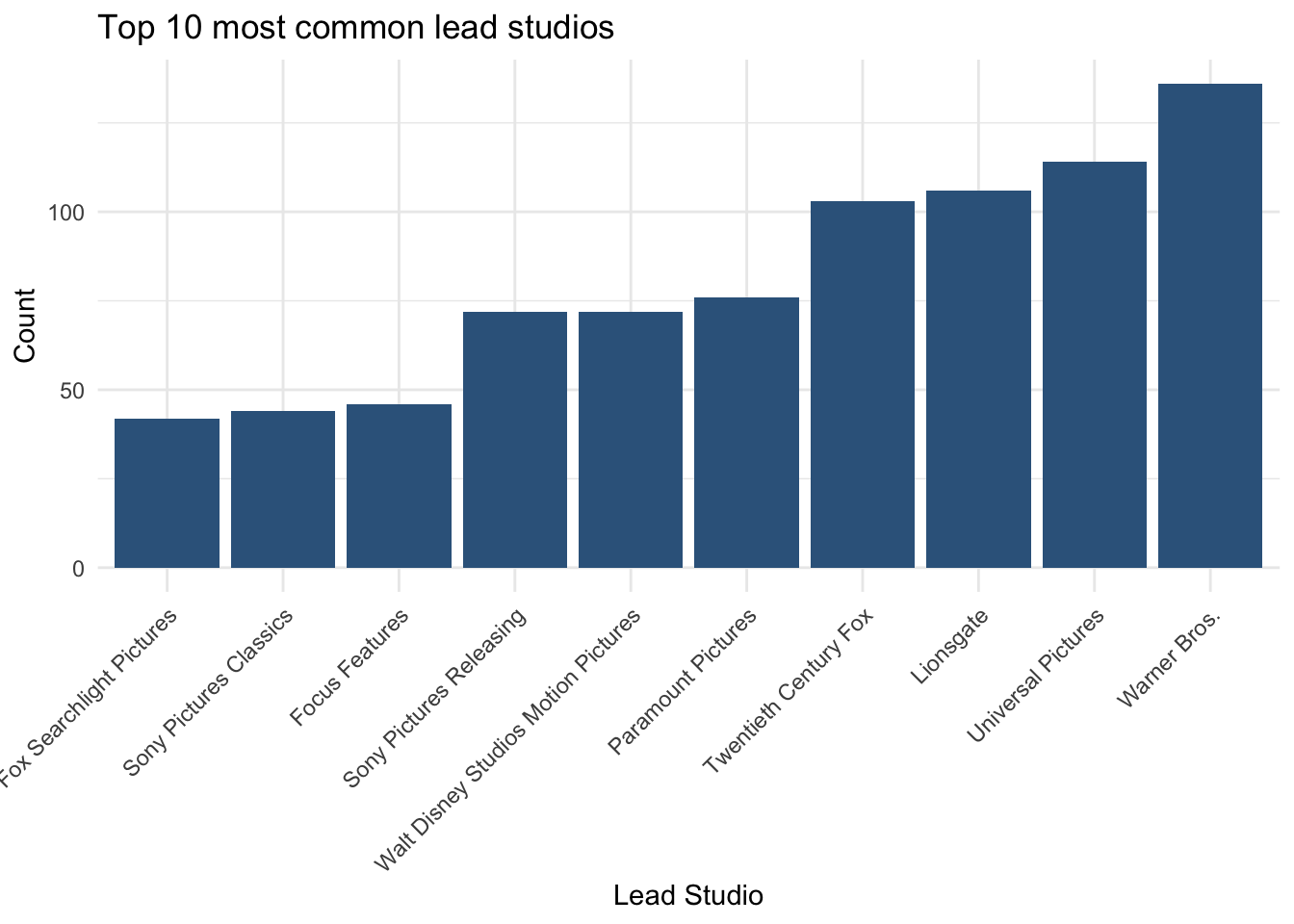
# ℹ 89 more rowsBecause there are many studios, it is often clearer to show only the most common ones.
tbl_studio_top10 <- tbl_studio |>
  slice_head(n = 10)

tbl_studio_top10
# A tibble: 10 × 3
LeadStudio n Percent
<fct> <int> <dbl>
1 Warner Bros. 136 10.5
2 Universal Pictures 114 8.8
3 Lionsgate 106 8.2
4 Twentieth Century Fox 103 8
5 Paramount Pictures 76 5.9
6 Sony Pictures Releasing 72 5.6
7 Walt Disney Studios Motion Pictures 72 5.6
8 Focus Features 46 3.6
9 Sony Pictures Classics 44 3.4
10 Fox Searchlight Pictures 42 3.23.4 Bar chart: LeadStudio
library(tidyverse)
library(forcats)

plot_LeadStudio  <- ggplot(movies, aes(x = fct_infreq(LeadStudio))) +
  geom_bar() +
  labs(
    x = "Lead Studio (sorted by frequency)",
    y = "Count",
    title = "Frequency of Lead Studios"
  ) +
  scale_y_continuous(
    breaks = seq(0, 150, by = 20)   # More detailed count axis
  ) +
  theme_minimal() +
  theme(
    axis.text.x = element_text(
      angle = 45,
      hjust = 1,
      size = 6,                    # Smaller labels so they fit
      lineheight = 0.8
    ),
    plot.title = element_text(size = 14, face = "bold"),
    axis.text.y = element_text(size = 9)
  )

plot_LeadStudio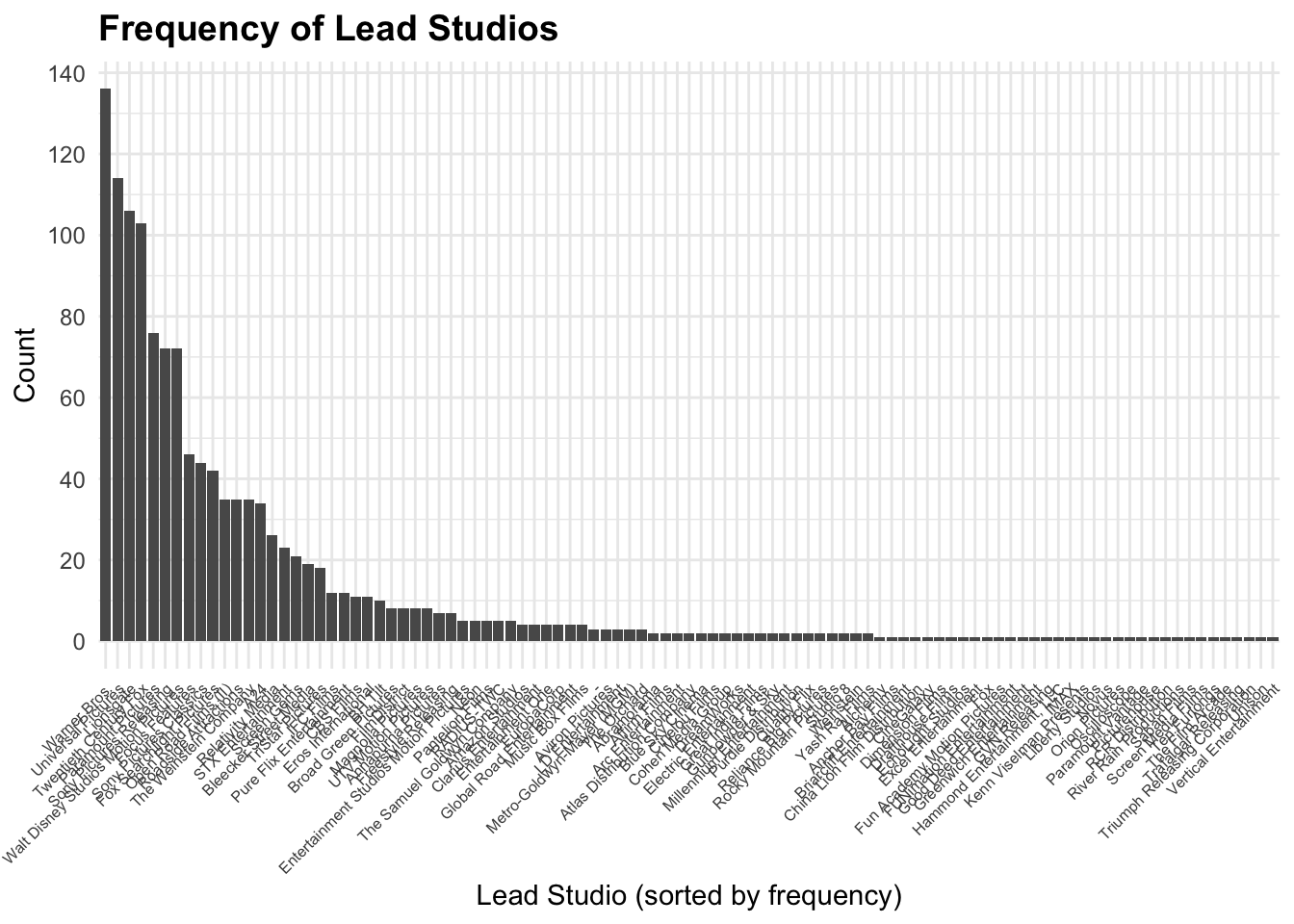
Flip
ggplot(movies, aes(x = fct_infreq(LeadStudio))) +
  geom_bar() +
  coord_flip() +
  labs(x = "Lead Studio (sorted by frequency)", y = "Count") +
  theme_minimal() +
  scale_y_continuous(breaks = seq(0, 150, by = 10))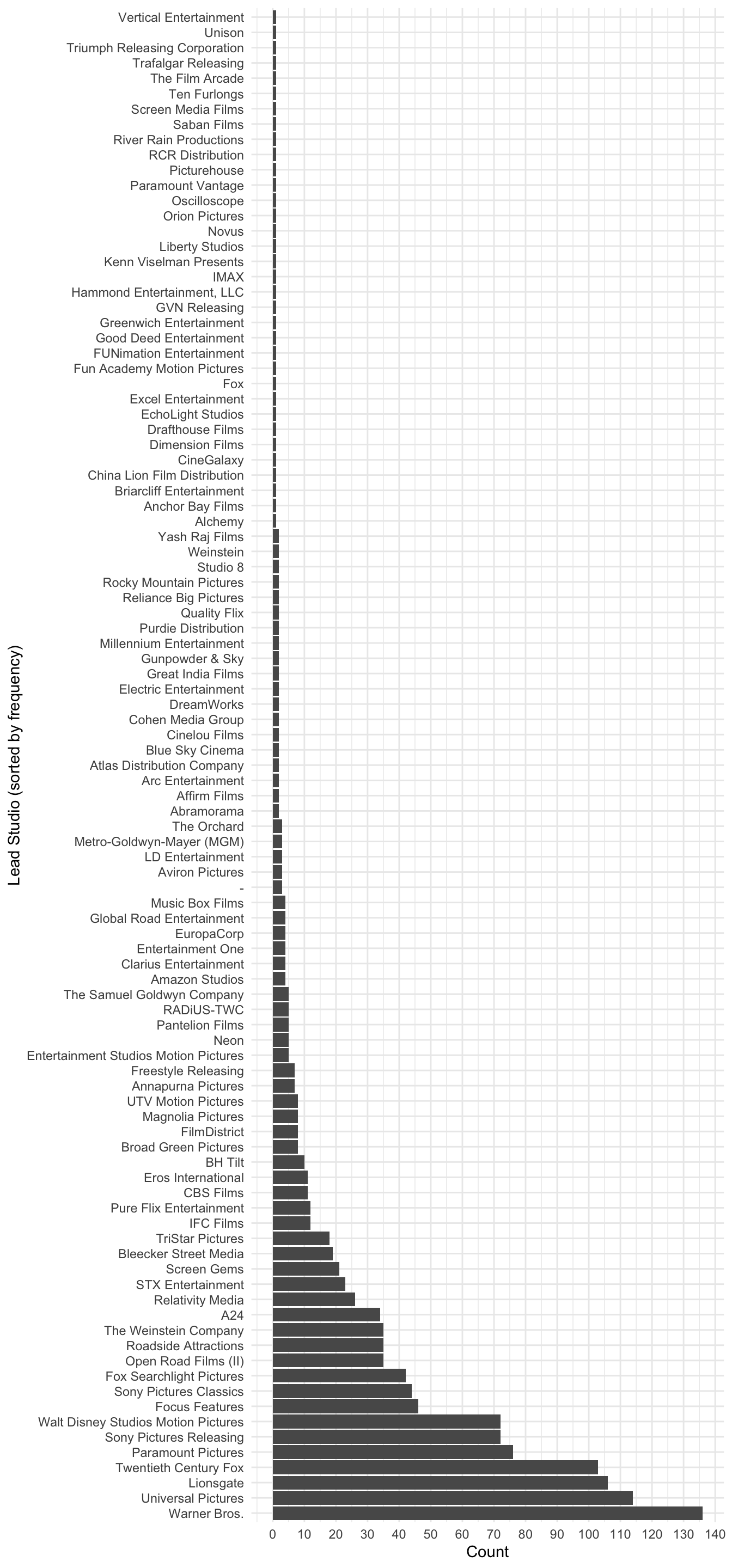
ggplot(tbl_studio_top10, aes(x = fct_reorder(LeadStudio, n), y = n)) +
  geom_col(fill = "steelblue4") +
  labs(
    x = "Lead Studio",
    y = "Count",
    title = "Top 10 most common lead studios"
  ) +
  theme_minimal() +
  theme(
    axis.text.x = element_text(angle = 45, hjust = 1)
  )
3.5 What is the most common category?
For nominal variables, the most common category is the mode.
a. Most common Genre
slice_max(tbl_genre, n, n = 1)# A tibble: 1 × 3
Genre n Percent
<fct> <int> <dbl>
1 Drama 386 29.8
This returns the genre with the highest number of movies.
b. Most common Lead Studio
slice_max(tbl_studio, n, n = 1)# A tibble: 1 × 3
LeadStudio n Percent
<fct> <int> <dbl>
1 Warner Bros. 136 10.5
This returns the studio that appears most frequently in the dataset.
What does slice_max() do?
n→ the column containing the countsn = 1→ return only the top category
So this code means:
“Give me the category with the highest count.”
How to describe this in your report
For example:
The most common genre in the dataset is Drama, accounting for 29.8% of all movies. This indicates that drama films are the most frequently represented category in the dataset. Similarly, the most common lead studio is Warner Bros., representing 10.5% of the observations. This suggests that this studio appears most frequently in the dataset.
3.6 Ordinal categorical variable: Year
Unlike Genre and LeadStudio, the variable Year has a natural order (time), so it is treated as an ordinal categorical variable.
This means:
the order of categories matters
we can summarise it using median and spread (IQR), not just counts
3.6.1 Frequency distribution of Year
tbl_year <- movies |>
  count(Year, name = "n") |>
  mutate(
    Percent = round((n / sum(n)) * 100, 2)
  )

tbl_year
# A tibble: 7 × 3
Year n Percent
<ord> <int> <dbl>
1 2012 169 13.0
2 2013 172 13.3
3 2014 197 15.2
4 2015 190 14.7
5 2016 196 15.1
6 2017 182 14.0
7 2018 189 14.6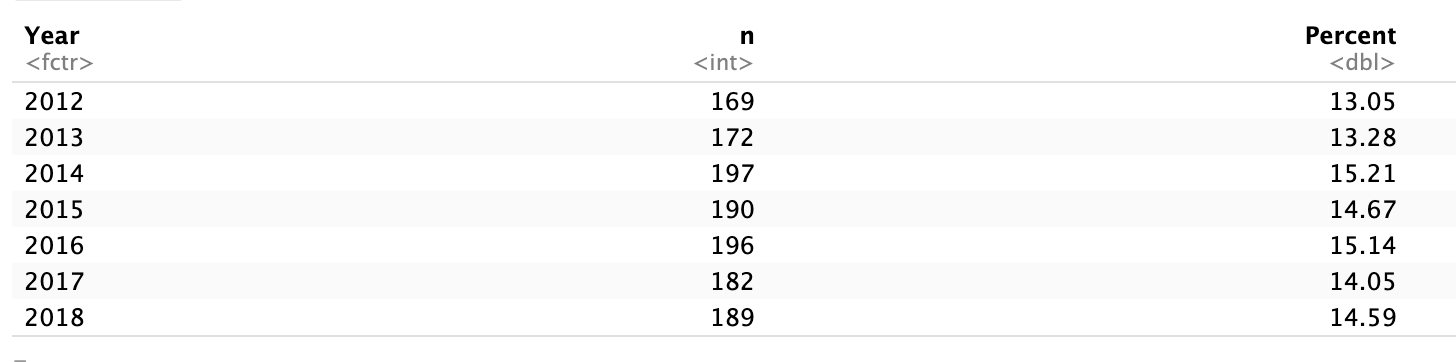
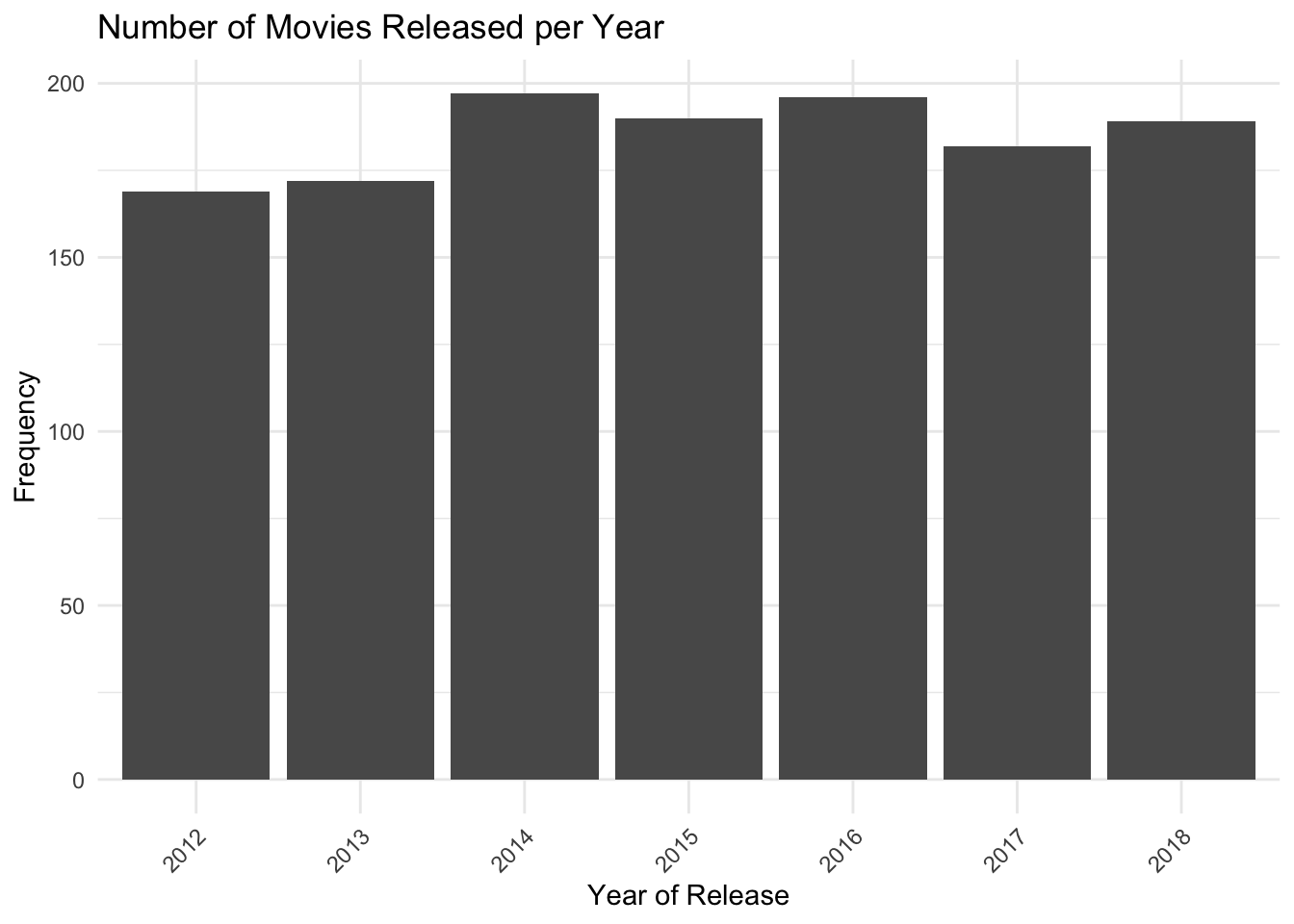
This shows how many movies were released in each year.
- Year frequency plot
ggplot(movies, aes(x = factor(Year))) +
geom_bar() +
labs(
x = "Year of Release",
y = "Frequency",
title = "Number of Movies Released per Year"
) +
theme_minimal() +
theme(
axis.text.x = element_text(
angle = 45,
hjust = 1
)
)
Formatting tables nicely
library(kableExtra)
Attaching package: 'kableExtra'The following object is masked from 'package:dplyr':
group_rowskbl(
list(
tbl_genre,
tbl_studio_top10
),
booktabs = TRUE,
digits = 2,
col.names = c("Category", "Count", "Percent")
)
|
|
If you prefer separate tables with captions you can reference in the text:
# Genre table
tbl_genre |>
  kbl(
    booktabs = TRUE,
    digits = 2,
    caption = "Frequency distribution of movie genres",
    col.names = c("Genre", "Count", "Percent")
)| Genre | Count | Percent |
|---|---|---|
| Drama | 386 | 29.8 |
| Comedy | 191 | 14.7 |
| Action | 170 | 13.1 |
| Adventure | 164 | 12.7 |
| Thriller | 155 | 12.0 |
| Horror | 85 | 6.6 |
| Romantic Comedy | 49 | 3.8 |
| Documentary | 41 | 3.2 |
| Black Comedy | 22 | 1.7 |
| Musical | 18 | 1.4 |
| Western | 10 | 0.8 |
| Concert | 4 | 0.3 |
# Lead studio table (top 10)
tbl_studio_top10 |>
  kbl(
    booktabs = TRUE,
    digits = 2,
    caption = "Top 10 most common lead studios",
    col.names = c("Lead Studio", "Count", "Percent")
)| Lead Studio | Count | Percent |
|---|---|---|
| Warner Bros. | 136 | 10.5 |
| Universal Pictures | 114 | 8.8 |
| Lionsgate | 106 | 8.2 |
| Twentieth Century Fox | 103 | 8.0 |
| Paramount Pictures | 76 | 5.9 |
| Sony Pictures Releasing | 72 | 5.6 |
| Walt Disney Studios Motion Pictures | 72 | 5.6 |
| Focus Features | 46 | 3.6 |
| Sony Pictures Classics | 44 | 3.4 |
| Fox Searchlight Pictures | 42 | 3.2 |
Then in your .qmd text you can reference them like:
Table \@ref(tab:genre-table) shows the frequency and percentage of each film genre.

Table \@ref(tab:studio-table) summarises the ten most common lead studios.
(using the corresponding chunk labels, e.g. {r genre-table} and {r studio-table} for the chunks that create each kbl).
What is the most common category?
Most common genre = category with the highest frequency
Most common lead studio = category with the highest frequency
You can identify this from the sorted tables or by using slice_max():
slice_max(tbl_genre, n, n = 1)# A tibble: 1 × 3
Genre n Percent
<fct> <int> <dbl>
1 Drama 386 29.8slice_max(tbl_studio, n, n = 1)# A tibble: 1 × 3
LeadStudio n Percent
<fct> <int> <dbl>
1 Warner Bros. 136 10.5Footnotes
Hint: Open the same
.qmdfile you used for Task 1 so you keep building a single report.↩︎Hint: Use
read_csv("datasets/CollegeScores_teaching.csv")from the readr package.↩︎Hint: Try
glimpse(college)from dplyr orstr(college).↩︎Hint: Use
mutate()withfactor(), for example
college <- college |> mutate(Control = factor(Control), Region = factor(Region)).↩︎Hint:
college |> count(Control) |> mutate(Percent = round(n / sum(n) * 100, 2)).↩︎Hint: Use
ggplot(college, aes(x = Control)) + geom_bar().↩︎Hint:
theme(axis.text.x = element_text(angle = 45, hjust = 1))andfct_infreq()from forcats.↩︎